
Digital Signage Deployment Examples
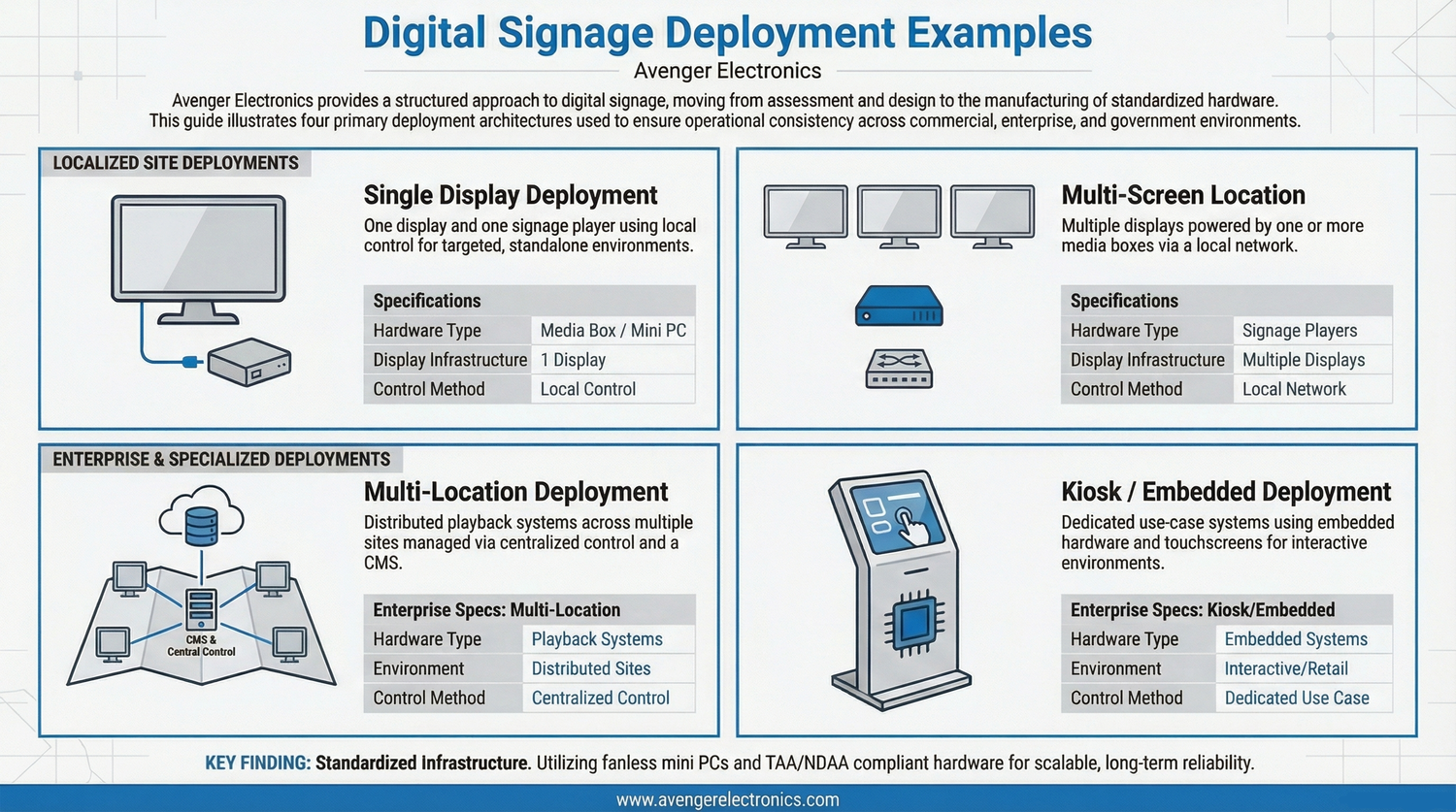
Digital signage deployment examples demonstrate how commercial display hardware and signage computing systems are configured within real-world digital signage infrastructure across commercial environments.
These configurations include media player systems, compact computing platforms, and structured system architecture designed to support reliable, scalable deployments across multiple locations.
Each deployment model illustrates how commercial digital signage infrastructure is implemented to support performance consistency, centralized control, and long-term scalability across distributed environments.
Define your deployment strategy →
Need a Deployment Plan?
Define your infrastructure, hardware selection, and rollout strategy before implementation.
Common Deployment Configurations
Single Location Deployment
Standalone systems using local playback hardware connected directly to displays.
- Minimal infrastructure
- Local or cloud-based control
- Simple system design
Multi-Location Networks
Standardized systems deployed across multiple sites with centralized management.
- Consistent configurations
- Remote system control
- Scalable architecture
Kiosk-Based Systems
Embedded computing platforms integrated into kiosks and interactive displays.
- Compact hardware
- Secure enclosures
- Touch-enabled interfaces
Video Wall Systems
Multi-display environments requiring synchronized playback and high-performance systems.
- Multi-output hardware
- Synchronized playback
- High-performance systems
Hardware Used in Deployments
Fanless Systems
Passive cooling systems designed for reliability and silent operation.
View fanless systems →Deployment Reliability
Pre-Configured Systems
Systems prepared before deployment improve consistency and reduce setup time.
Standardized Hardware
Uniform hardware configurations reduce maintenance complexity.
Centralized Management
Remote monitoring and control across all deployment locations.
Scalable Infrastructure
Infrastructure designed to support expansion without redesign.
View scalable systems →Industries Using These Deployments
Retail Environments
Multi-location display systems for customer engagement and promotions.
View retail →Healthcare Systems
Display infrastructure supporting communication across facilities.
View healthcare →Enterprise Networks
Internal communication systems across distributed corporate environments.
View enterprise →Deployment Structure Determines System Performance
Effective digital signage deployments depend on alignment between hardware, infrastructure, and system architecture, ensuring reliable performance and scalable digital signage infrastructure across all environments.
Related Pages
- Digital signage systems
- Commercial display hardware
- Signage computing systems
- System planning guide
- System architecture
- Deployment environments
- Case studies
Frequently Asked Questions
What is a digital signage deployment?
A deployment refers to the setup and configuration of hardware, software, and infrastructure within a specific environment.
What hardware is required?
Media players, mini PCs, and commercial displays are used depending on deployment requirements.
Can deployments scale?
Yes, structured systems allow expansion across additional locations without redesign.
Are systems managed remotely?
Most deployments include centralized management for monitoring and control.
Plan Your Deployment
Define your system architecture, hardware selection, and deployment strategy.